Best Free Instagram Schedulers in 2026 (Tested & Ranked)
Manually posting every day at the exact right time is unsustainable. Here are the best free tools to schedule your Instagram content — tested, ranked, and no fluff.
Best Free Instagram Schedulers 2026
If you're still opening Instagram at 9am every day to manually post, you're wasting time and likely missing your optimal posting windows. An Instagram scheduler lets you batch your content creation, post at the right times automatically, and stay consistent without the daily grind.
Here are the best no-cost options in 2026 — what each tool does well, what the free tier actually includes, and who each is best for.
What to Look For in a Free Instagram Scheduler
- Official Meta API: Non-negotiable. Any tool not using the official Instagram Graph API risks getting your account flagged or banned.
- Reel support: Reels are the primary growth format in 2026. If a scheduler doesn't support them, skip it.
- AI timing suggestions: Generic "best time to post" advice is useless. You need a tool that analyzes your actual audience.
- No post limits that cripple the free plan: Some tools limit you to 3 posts/month free, which is essentially unusable.
1. InstaGrow — Best for Creators Who Want More Than Just Scheduling
InstaGrow
100% FreeInstaGrow combines scheduling with AI-powered moderation and analytics — so you're not just scheduling posts, you're managing your entire Instagram presence from one dashboard. Every feature is included at no charge: scheduler, full analytics, AI posting time recommendations, comment moderation, Creator Intelligence, and unlimited accounts. New to the tool? Follow the step-by-step guide to scheduling your first post.
Best for: Creators who want scheduling + comment moderation + analytics in one tool. Cost: No charge, no credit card, no limits.
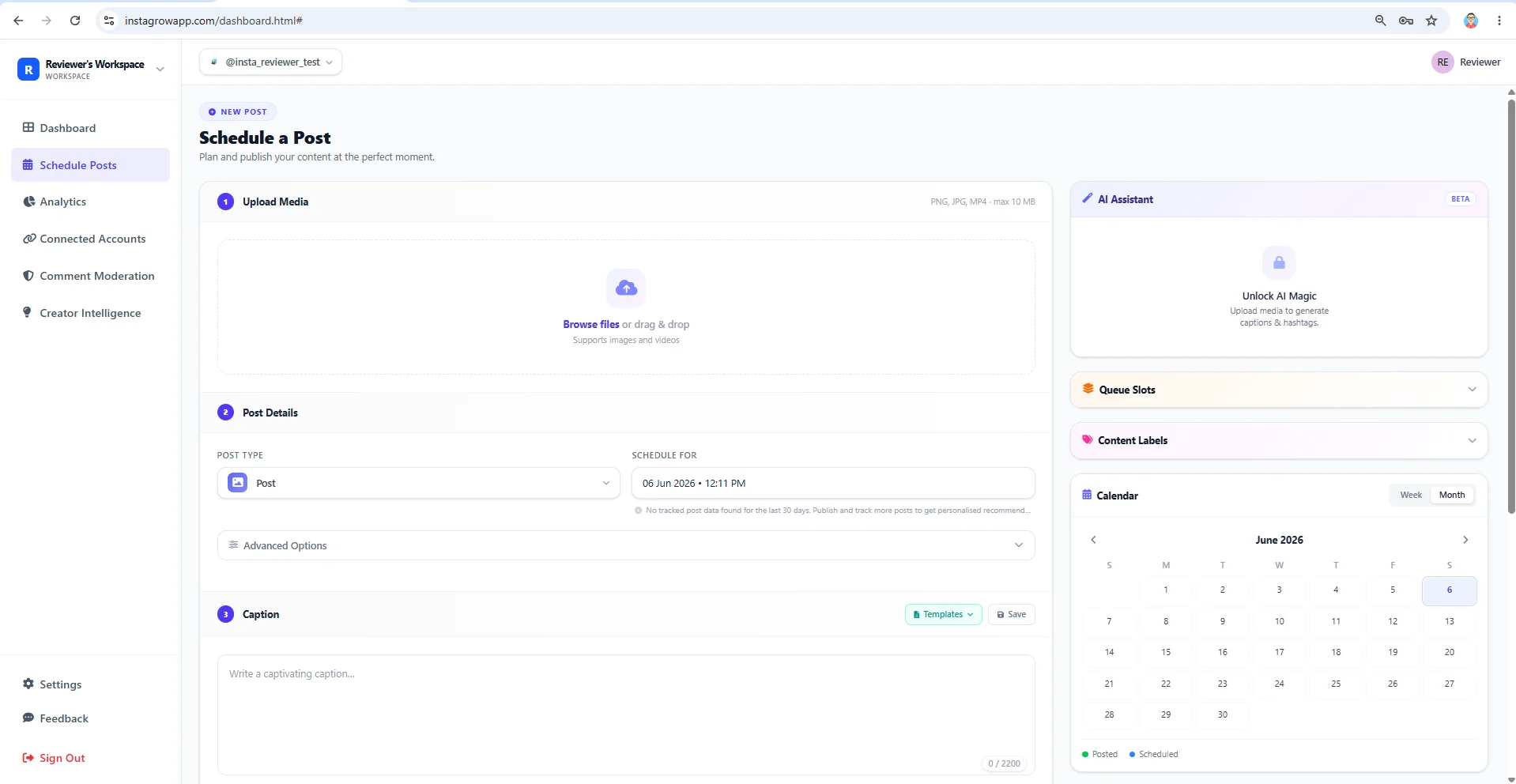
2. Meta Business Suite — Best Free Option from Instagram Itself
Meta's own scheduling tool is officially supported and costs nothing. It handles posts, Stories, and Reels. The interface is clunky and analytics are basic, but it works and has zero account risk since it's literally Instagram's own tool.
Best for: Creators who want a zero-cost, zero-risk option with no post limits. Downside: No AI features, no moderation tools, and the UX is genuinely painful to use.
3. Later — Best Free Option for Visual Content Planners
Later has a clean visual feed planner that lets you drag and drop posts to preview how your grid will look. The starter plan allows 30 posts per month — enough for 1 post per day. It's Instagram-only on the base tier and lacks any moderation or analytics depth.
Best for: Aesthetic-focused creators who care about grid appearance. Downside: 30-post limit, limited analytics, no comment moderation.
Schedule smarter with InstaGrow
Post at the perfect time every time. InstaGrow's AI finds when your audience is most active so every post gets maximum reach.
Schedule Free on InstaGrow4. Buffer — Best for Multi-Platform Creators
Buffer's entry-tier plan lets you connect 3 social channels and schedule up to 10 posts per channel at a time. If you're posting across Instagram, Facebook, and LinkedIn simultaneously, Buffer is worth considering. The interface is clean and straightforward.
Best for: Creators or small businesses posting on multiple platforms. Downside: Queue limit of 10 posts per channel, no analytics without upgrading, no AI features.
5. Publer — Best for Creators Who Want Buffer-Like Flexibility
Publer is a lesser-known alternative to Buffer with a cleaner scheduling interface. The base plan covers 3 social accounts — including Instagram — with up to 10 scheduled posts per account at any time. It supports image and video posts on the base tier; Reels scheduling requires an upgrade. The calendar view is one of the cleaner ones on this list.
Best for: Creators who prefer a visual calendar over Buffer's queue-style interface. Downside: Reels not supported without upgrading, no AI features, limited analytics.
Which Free Scheduler Should You Use?
| Tool | Reels | AI Timing | Moderation | Free Posts |
|---|---|---|---|---|
| InstaGrow | ✅ Yes | ✅ Yes | ✅ Yes | Generous |
| Meta Business Suite | ✅ Yes | ❌ No | ❌ No | Unlimited |
| Later | ⚠️ Paid only | ⚠️ Basic | ❌ No | 30/month |
| Buffer | ✅ Yes | ❌ No | ❌ No | 10 queued |
| Publer | ❌ Paid only | ❌ No | ❌ No | 10 queued |
If you only need basic scheduling with no post limits and zero cost, Meta Business Suite gets the job done. If you want AI posting times, comment moderation, and real analytics alongside scheduling, InstaGrow gives you all of that in one place — which means fewer tools to juggle and a cleaner workflow overall. That full-stack approach is what separates a complete Instagram growth app from a standalone scheduler.
The Verdict: Best Free Instagram Scheduler for Each Use Case
- Best all-in-one tool at no cost: InstaGrow — scheduling + AI timing + comment moderation + analytics in a single plan. Start with the step-by-step guide to schedule your first post.
- Best zero-cost no-limits option: Meta Business Suite — no post limits, built by Instagram directly. Clunky but reliable.
- Best for visual grid planning: Later — drag-and-drop feed preview, 30 posts/month on the starter tier. Best for aesthetic accounts.
- Best for multi-platform posting: Buffer — 3 channels on the base plan, covers Instagram + Facebook + LinkedIn simultaneously.
- Best calendar interface: Publer — cleaner visual calendar than Buffer, 3 accounts on the base plan, good for solo creators.
For a deeper look at how posting time affects reach, see our 2026 guide to the best time to post on Instagram.
Posts vs Reels vs Stories: What Each Scheduler Actually Supports
Not every scheduler handles all three Instagram content formats equally. Here's what to expect across the five tools covered above:
| Tool | Feed Posts | Reels | Stories | Carousels |
|---|---|---|---|---|
| InstaGrow | ✅ Yes | ✅ Yes | ✅ Yes | ✅ Yes |
| Meta Business Suite | ✅ Yes | ✅ Yes | ✅ Yes | ✅ Yes |
| Later | ✅ Yes | ⚠️ Paid only | ⚠️ Paid only | ✅ Yes |
| Buffer | ✅ Yes | ✅ Yes | ❌ No | ✅ Yes |
| Publer | ✅ Yes | ⚠️ Paid only | ⚠️ Paid only | ✅ Yes |
If Stories scheduling is important to your strategy, most tools restrict this to paid tiers — except Meta Business Suite and InstaGrow. For a detailed walkthrough of the Stories scheduling flow specifically, see the guide to scheduling Instagram Stories.
Does Scheduling Hurt Your Reach on Instagram?
This is one of the most common questions creators ask, and the short answer is: no, scheduling does not hurt reach — as long as the tool you use publishes through the official Instagram Graph API.
Instagram's algorithm does not penalise third-party scheduling tools that use the official API. Meta explicitly supports this use case through its Business API programme. What does hurt reach is using unofficial automation tools (bots, browser emulators, or session-hijacking apps) that simulate human behavior — those violate Instagram's Terms of Service and can trigger shadowbans or account suspension.
Every tool on this list — InstaGrow, Meta Business Suite, Later, Buffer, and Publer — uses the official API. You can schedule safely with any of them.
Frequently Asked Questions
What is the best free Instagram scheduler in 2026?
The best free Instagram schedulers in 2026 include InstaGrow (completely free — unlimited accounts, AI timing, comment moderation, full analytics), Later Free (30 posts/month), Buffer Free (3 channels), and Meta Business Suite (native, unlimited posts). InstaGrow is the most complete free option with no post caps, no account limits, and no paid upgrade.
Can you schedule Instagram posts for free?
Yes. Multiple tools offer free Instagram scheduling including InstaGrow, Later, Buffer, and Meta Business Suite. Most tools cap their free tier — InstaGrow is the exception: completely free with no post cap, no account limit, and no paid upgrade required.
Do free Instagram schedulers work with Reels?
Yes, most modern free schedulers support Reels scheduling, though some have limitations. InstaGrow's free plan, Buffer Free, and Meta Business Suite all support Reels. Always verify that the tool uses the official Instagram Graph API to avoid Terms of Service violations.
Content Strategist at InstaGrow
Yamini is a content strategist at InstaGrow covering Instagram scheduling, follower growth, and spam management. She tests features hands-on and translates InstaGrow's platform data into practical guides for creators, influencers, and small business owners.
Related Articles
- How to Grow Instagram from 0 to 10K Followers (2026) — Scheduling is a core pillar of growth
- Best Time to Post on Instagram in 2026 (AI Data) — Schedule posts for maximum reach
- 12 Proven Ways to Get More Instagram Comments (2026) — Consistent scheduling drives more comments
- How to Automate Instagram Comments — Automate your comments just like your posts
- How to Schedule Instagram Reels for Free — Reels-specific scheduling guide
- How to Schedule Instagram Stories for Free in 2026 — Stories-specific scheduling guide with format specs
- InstaGrow Review 2026 — Features, Pricing & Honest Verdict — See how InstaGrow stacks up as a free scheduler
- Best Instagram Growth App in 2026 — Real Growth, Zero Risk — When you need more than just a scheduler